FAQ
My preset lands far after my text layer, sometimes out of the composition
This was a bug of the presets saved before Textevo 2026: they stored their keyframes from the start of the composition they were saved in. Update Textevo, open the presets window and accept to update your old presets: see Presets saved with an older version.
My elastic or bounce doesn't show
The Elastic and the Bounce start from the speed of the Strength when it reaches a keyframe: a keyframe eased on arrival arrives with a speed of 0, and nothing happens after it. Let Textevo optimize the keyframes, or make them arrive linear: see Eased keyframes.
Why use the Remove and Rename buttons?
A Textevo is made of an effect and a text animator linked by expressions. After Effects doesn't tell scripts when you delete or rename an effect by hand, so Textevo cannot fix things afterwards:
- deleting the effect by hand leaves its text animator on the layer, with expression errors: delete it by hand too, or better, use the Remove button;
- renaming the effect by hand updates the expressions but not the name of the text animator: use the Rename button to keep both names in sync.
Why isn't "Based on" in the effect?
This option can't be controlled by expressions, that's why it is a button of the panel.
Why isn't there a fill color in the effect?
It would override the color of your text even at 0 % of strength. But you can add a Fill Color (or a stroke...) to the Textevo text animator yourself, with the Add menu of the animator: it follows the strength like the other properties.
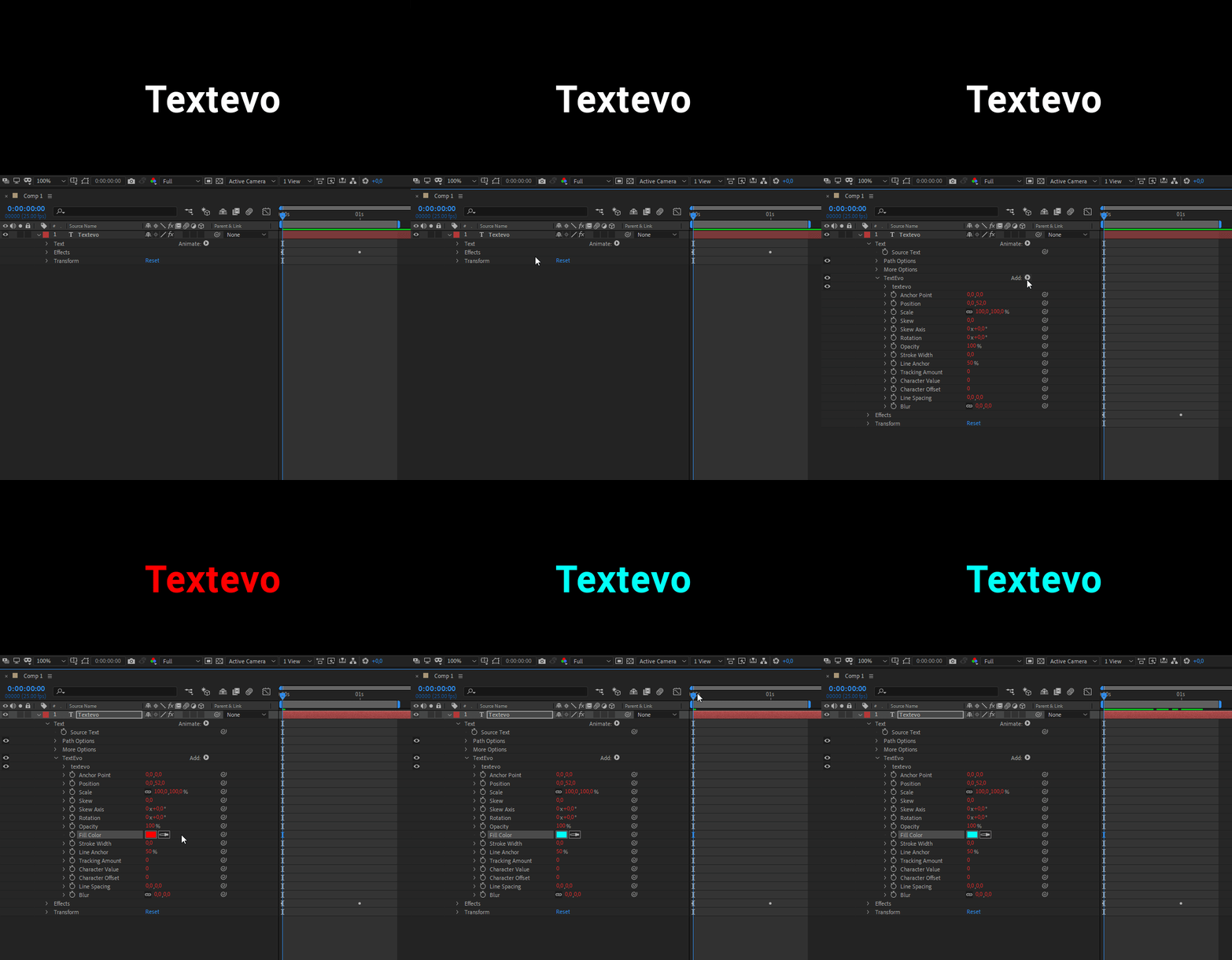
What you add to the text animator is kept when you copy the Textevo, save it as a preset, switch 2D / 3D or change its motion.
Can a preset save a drop shadow, a glow or my own selectors?
Yes. What you add to the Textevo text animator (a wiggly selector, a fill color...) is always saved. The other effects of the layer (drop shadow, glow, blur...) are saved when you save the whole layer and choose Save all: see Save a preset.
Can I apply a preset on several layers?
Yes: select all the text layers, then apply the preset. With no text layer selected, Textevo creates one.
How do I share my presets?
A preset is a .json file in the presets folder of Textevo (see Where are the presets?). Send the file: the other person copies it in their presets folder and clicks refresh in the presets window.
After Effects asks to allow scripts to write files
Textevo saves its settings and presets on your computer: check "Allow Scripts to Write Files and Access Network" in the preferences. See Installation.