Motion
The Motion button adds an Elastic, a Bounce or an Oscillation to the strength of a Textevo.
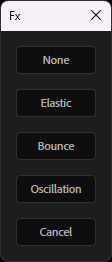
Select one or more Textevo effects (or text layers, for all their Textevo), click Motion and choose:
- a Textevo gets the chosen motion, keeping its keyframes,
- a text layer without Textevo gets a new Textevo with this motion,
- with no text layer selected, Textevo creates a text layer with a Textevo and this motion.
A Textevo created with an Elastic or a Bounce is ready to play: its two keyframes are 12 frames apart (see the settings), with a slow departure and a linear arrival, so the overshoot shows right away.
| Motion | What it does | Controls |
|---|---|---|
| None | back to the standard Textevo | |
| Elastic | overshoots and wobbles after each keyframe | Amplitude, Frequency, Decay |
| Bounce | bounces back after each keyframe | Elasticity, Gravity, Max bounces |
| Oscillation | a continuous sine wave on the strength | Amplitude, Frequency, Phase per character |
The motion controls are in a new group at the end of the effect: tweak and keyframe them like any other parameter.
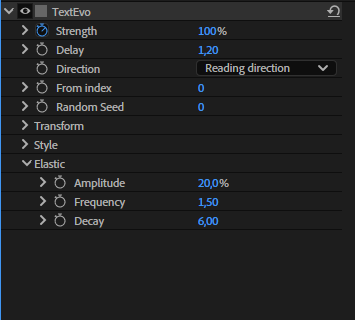
The motion follows the delay of each letter, word or line, like the rest of the animation. The effect keeps its name, its position, its keyframes and its "Based on" mode, and the motion is saved in the copies and the presets.
Elastic
After each keyframe of the Strength, the text goes past its value and wobbles back to it.
- Amplitude: how far it goes past the value.
- Frequency: the number of wobbles per second.
- Decay: how fast the wobbles fade out.
Bounce
After each keyframe of the Strength, the text bounces back, like a ball on the floor.
- Elasticity: the height of each bounce compared to the previous one.
- Gravity: higher values give faster, smaller bounces.
- Max bounces: the number of bounces.
Oscillation
A continuous sine wave added to the strength, even without keyframes: floating texts, pulses...
- Amplitude: the size of the oscillation, in % of strength.
- Frequency: the number of oscillations per second.
- Phase per character: offsets each letter, word or line, for a wave through the text.
Eased keyframes
The Elastic and the Bounce start from the speed of the Strength when it reaches a keyframe. A keyframe eased on arrival (Easy Ease, or the "Second key" influence of the settings) arrives with a speed of 0: nothing happens after it.
When you choose Elastic or Bounce, or paste or apply a preset using them, Textevo detects these keyframes and asks what to do:
- Optimized keys: linear arrival, and a slow departure from the previous keyframe (at least 75 % of influence): the speed builds up and the keyframe is reached fast. The strongest effect.
- Linear arrival: only removes the ease on arrival.
- Keep the keys: changes nothing.
Check Don't ask again to always do the same thing. The choice can be changed in the settings: "Elastic / bounce on eased keys".
Tip
Keyframes closer to each other also give a stronger elastic or bounce: the arrival is faster.
Delay from markers
The Delay panel of the Motion window chooses what starts each letter, word or line:
- Frames: the usual delay, in frames between two letters, words or lines (the Delay of the effect).
- Markers: each letter, word or line starts at a marker of the layer: the first one at the first marker, the second at the second marker... Move the markers to change the timing, for example to sync the words with a voice over. The name of the markers doesn't matter.
Add or update the markers adds one marker per letter, word or line (according to the Based on mode and the Direction), named after it, from the first keyframe of Strength. The markers already added by Textevo are replaced: after correcting the text, click Markers again to get the markers of the new text. The markers you added yourself stay. It is checked when a selected layer has no markers, or when its text no longer matches the markers of Textevo. The markers are added:
- At a reading speed (by default, 180 words per minute): a long word stays longer than a short one, and the text pauses after a comma, longer after a period or at the end of a line. The rhythm of someone reading the text, a good start for kinetic typography; move a few markers to fine-tune it. When the text needs more time than the layer, the layer is lengthened.
- Spread over the layer: the same time between the markers, the last one so that its animation ends at the end of the layer.
The choice and the speed are remembered, and used by the presets too (see the settings). With the Random direction, the markers are always spread over the layer: the order of the letters is only known by the expression.
- The animation of each letter, word or line is the one of the keyframes of Strength, moved to start at its marker.
- With the Outward or Inward direction, the letters that start together share a marker.
- The letters, words or lines after the last marker keep the delay in frames after it.
- The markers mode is kept by the copies, the presets, 2D / 3D and the motions. The markers themselves are not copied: pasted or applied as a preset on a layer without markers, the Textevo adds its markers, one per letter, word or line of the new text. A layer that already has markers keeps them.
- With nothing selected, Markers creates a text layer with a Textevo in markers mode.
Note
The markers are shared by all the Textevo of the layer: use the markers mode on one Textevo (the entrance for example) and the delay in frames on the others.