Settings
Click the Settings button of the panel.
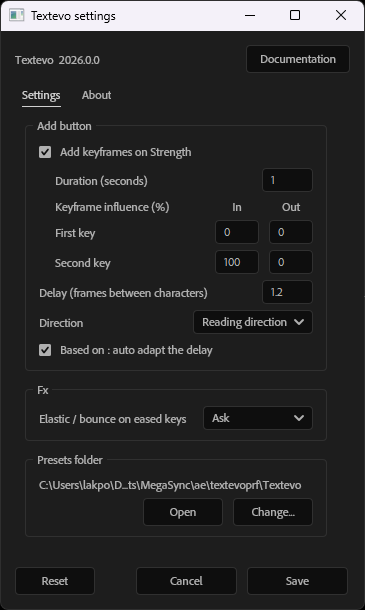
Change the values, then click Save. Cancel closes the window without saving, Reset puts back the default values (saved when you click Save).
Add button
The values used when you click Add.
- Add keyframes on Strength
- Adds two keyframes on the strength of the new Textevo: from 100 % to 0 %, or from 0 % to 100 % with Alt + click on Add. Unchecked, the Textevo is added without keyframes.
- Duration (seconds)
- The time between the two keyframes.
- Keyframe influence (%)
- The easing of the two keyframes: the In and Out influence of the First key and of the Second key, from 0 (linear) to 100. With Alt + click on Add, the easing is mirrored.
- Delay (frames between characters)
- The delay of the new Textevo.
- Direction
- The direction of the new Textevo.
- Based on : auto adapt the delay
- When you change the "Based on" mode, adjusts the delay to the new number of letters, words or lines.
- Based on : match the anchor point grouping
- When you change the "Based on" mode, also sets the anchor point grouping of the layer: character, word or line. This is the default state of the checkbox of the Based on window.
Motion
- New elastic / bounce : frames between keys
- A Textevo created with the Motion button (on a text layer without Textevo, or with no text layer selected): the number of frames between its two keyframes. 12 by default: closer keyframes give a stronger elastic or bounce.
- Delay from markers : added markers
- How the markers are added for the delay from markers, by the Motion window and the presets: At a reading speed (long words and punctuation take longer) or Spread over the layer.
- Reading speed (words per minute)
- The speed of At a reading speed: 180 by default, about the speed of a text read on screen; 250 for a fast reader.
- Elastic / bounce on eased keys
- What to do with the keyframes eased on arrival when an Elastic or a Bounce is set: Ask, Keep the keys, Linear arrival or Optimized keys. See Eased keyframes.
Presets folder
Where Textevo saves its settings and presets. Open shows the folder, Change... chooses another one.
Note
Changing the folder doesn't move your presets: copy the presets folder to the new place if you want to keep them.
About
The version of Textevo, and a link to this documentation.